For many desks, adding a triple monitor setup boosts productivity and multitasking capability. Affordable triple monitor stands offer solid stability, ergonomic adjustability, and a clean, organized workspace without a premium price tag. This guide highlights five budget-friendly options that support standard sizes and VESA patterns, along with practical buying considerations to help you choose the right mount for your needs.
| Product | Brand | Monitor Size Range | Weight Capacity (per arm) |
|---|---|---|---|
| WALI MF003 | WALI | up to 27 inches | 22 lbs |
| WALI MF003N | WALI | up to 27 inches | 4.4-15.4 lbs |
| HUANUO Triple Mount | HUANUO | up to 27 inches | 4.4-17.6 lbs |
| VIVO STAND-V003E | VIVO | up to 30 inches | 10 kg per arm |
| Suprogear Triple Stand | Suprogear | up to 27 inches | 22 lbs |
WALI MF003 Triple Monitor Stand Review

The WALI MF003 is a free-standing triple monitor stand designed for up to 27-inch screens with a per-arm weight capacity of 22 pounds. It offers detachable mount plates and height adjustability compatible with VESA 75x75mm or 100x100mm patterns. The stand presents two setup options: a free-standing base for desktop use or a 4” diameter Grommet-Base suitable for thicker desks, making it versatile for different workspaces. Arm supports provide full height adjustability on a 16-inch pole, with tilt and swivel features for the center and side monitors. This model supports portrait and landscape orientations, aiding varied workflow needs without requiring desk modification.
- Compatibility: Up to 27 inches, 22 lbs per arm, VESA 75x75mm / 100x100mm
- Two installation modes: Free-standing or Grommet-Base
- Full motion: Tilt, swivel, and rotate to switch between reading angles
WALI Free Standing MF003N: Heavy-Duty Triple Mount

This WALI model provides universal compatibility for 13–27 inch screens with a weight range of 4.4–15.4 lbs for individual arms. It supports VESA 75x75mm or 100x100mm patterns and emphasizes desk space efficiency by elevating three monitors off the workspace. Integrated cable management helps maintain a tidy desk, while the arms offer tilt (+/-45 degrees), swivel (+/-90 degrees), and 360-degree rotation for flexible viewing angles. The triple mount is designed to maximize work area without compromising stability, making it a solid choice for multi-monitor setups in compact offices.
- Universal compatibility: 13–27 inch screens, 4.4–15.4 lbs per arm
- Cable management: Integrated to reduce clutter
- Fully adjustable: Tilt, swivel, and rotation for ideal ergonomics
HUANUO Triple Monitor Mount For 17–32 Inches

The HUANUO triple monitor arm supports monitors up to 32 inches with VESA 75x75mm or 100x100mm patterns and a 17.6 lb per-arm weight range. It emphasizes space-saving design, enabling three screens to be elevated for a more expansive desk surface. The arms offer a full range of motion: 360-degree rotation, +/-90-degree swivel, +/-45-degree tilt, and a 12.2-inch height adjustment, allowing diverse viewing angles whether for productivity tasks, design work, or presentations. The clamp and grommet mounting kit enhances versatility for different desk types, from laminate to thick desktops.
- Monitors up to 32 inches; weight per arm up to 17.6 lbs
- 12.2″ height adjustment; 360° rotation; tilt and swivel
- VESA 75x75mm / 100x100mm compatibility
VIVO STAND-V003E Triple Desk Mount
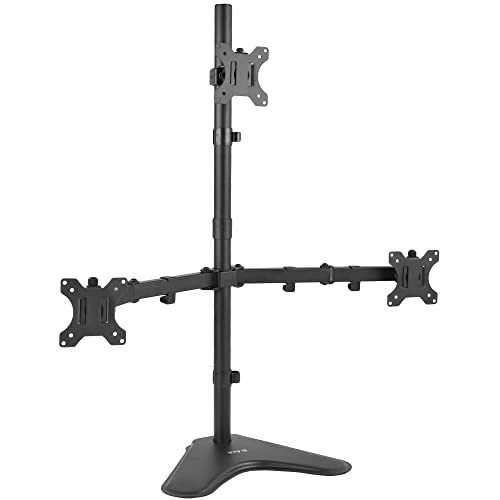
The VIVO STAND-V003E supports three screens up to 30 inches, with a 10 kg (approximately 22 lbs) weight limit per arm and VESA mounting options of 75x75mm or 100x100mm. The arms offer tilt (+/-15 degrees), 360-degree swivel, and 360-degree rotation, with adjustable height along a central pole to optimize viewing angles. A sturdy base measures 40.0 cm by 27.9 cm and includes desk padding for surface protection. Detachable cable clips help keep lines tidy, while safety-conscious mounting prevents sag or wobble under typical office use.
- Fits 13″ to 30″ screens; weight per arm up to 22 lbs
- Full motion: tilt, swivel, rotation, and height adjustment
- Detachable cable clips; padded desk base
WALI M003S Triple Monitor Mount

The WALI M003S offers compatibility with most LCD and LED screens up to 27 inches and supports up to 22 pounds per arm. The dual mounting plates are detachable and height-adjustable, with side arms extending and retracting. The mounting system supports tilt, swivel, and rotation between landscape and portrait modes to maximize viewing and productivity. The stand emphasizes a modern aesthetic with a sturdy, stable connection while maintaining a clean desk footprint for multi-monitor configurations.
- Compatibility: 27″ max; 22 lbs per arm
- Detachable plates; height adjustable
- Tilt, swivel, and rotate for flexible viewing
Buying Guide: Key Purchase Considerations
- Monitor compatibility: Check maximum screen size, weight per arm, and VESA pattern (75x75mm or 100x100mm). Some models support up to 27 inches, others up to 30 inches; weight limits vary from roughly 4.4 to 22 lbs per arm. Ensure your displays match these specs to avoid performance issues.
- Mount type: Decide between free-standing bases, grommet installations, or clamp options. Free-standing mounts are easy to set up on any desk; grommet bases require desk holes or thicker desks and provide strong stability. Clamps are simpler but may not fit all edge designs.
- Adjustability: Look for tilt, swivel, and rotation capabilities, plus height adjustment on a central pole. Full motion helps reduce neck strain and enables landscape or portrait display modes as needed for tasks like coding, design work, or trading dashboards.
- Desk footprint and cable management: Consider base dimensions to ensure your setup fits the workspace. Cable management features keep wires tidy and reduce clutter around the desk edge.
- Durability and warranty: Aluminum or high-grade steel builds contribute to long-term stability, especially for three-monitor configurations. Check product warranties and reviews for hints on wobble and sag under load.
- Aesthetics and desk compatibility: Some mounts blend with modern office decors, while others emphasize a minimalistic, heavy-duty look. The finish (black, silver, matte) should align with your desk and peripherals.
- Installation complexity: Some stands offer straightforward assembly with common tools, while others include more extensive mounting kits. If you’re unsure, choose models with clear instructions and support resources.
Choosing a budget triple monitor stand involves balancing compatibility, adjustability, and desk compatibility. The products listed above are designed to provide solid performance at accessible prices while preserving flexibility for a range of office layouts and tasks. Consider your primary use case—coding, editing, trading, or design—as you compare motion ranges, mounting methods, and space-saving features.