Finding the right desk drawer keyboard tray can free up valuable desk space while promoting ergonomic typing. This guide reviews five top picks, highlighting each tray’s space-saving design, adjustability, and compatibility. Details include mounting style, tilt range, and extra features to help you choose the best fit for home offices, corporate desks, or gaming setups.
| Product | Brand | Key Features | Link |
|---|---|---|---|
| VIVO Large Keyboard Tray Under Desk | VIVO | Extends up to 8.5″, clamps for sturdy mount, 11 lb capacity | View |
| Fellowes Office Suites Underdesk Keyboard Drawer | Fellowes | Height adjustable, right/left mouse tray, stows under | View |
| HUANUO Keyboard Tray Under Desk | HUANUO | 360-degree swivel, tilt and height adjustable | View |
| BONTEC KMT01 Under Desk Tray | BONTEC | Wide compatibility, 31.3″ width minimum, 11.4″ depth | View |
| Kensington Keyboard Tray Under Desk | Kensington | SmartFit height adjustment, extra-wide 24.5″ tray | View |
VIVO Large Keyboard Tray Under Desk With Clamp Mount

The VIVO MOUNT-KB05E tray is designed to free desk space by mounting below the work surface. It measures 32.5″ total length from clamp to clamp, with a 27″ platform plus 8.5″ extension from the edge of the desk. Its 11 lb capacity supports keyboards, mice, and small accessories. The clamp system helps preserve desk integrity while enabling easy in/out motion for ergonomic typing angles. Before purchasing, verify desk thickness and available clamp-to-clamp space to ensure compatibility.
Key points include the substantial extension, ergonomic typing angles, and a straightforward pull-out mechanism. The setup is best for larger desks with flat surfaces and sufficient clamp space. Consider desk thickness limits and ensure there is adequate space for full extension without hitting edges or hardware on the underside.
Ideal for users seeking a heavy-duty under-desk tray with a simple, stable clamp system and a wide-working footprint. It balances space savings with robust support, suitable for long typing sessions and shared workstations where desk real estate matters.
Fellowes Office Suites Underdesk Keyboard Drawer

The Fellowes Office Suites tray emphasizes height adjustability and flexible mouse tray placement. It accommodates standard keyboards and includes a mouse tray that can mount on the right or left side, or even stow away beneath the tray when not in use. This model helps keep the desk surface clear, enabling better posture and smoother transitions between standing and sitting. Installation requires space for the tray to slide out and clear desk edges during use.
With multiple adjustment options, this tray supports various work preferences and setups. Users seeking a modular, space-saving solution with easy relocation of the mouse area will benefit from its versatile mounting. The sturdy construction and fits-for-most keyboards make it a practical choice for shared workstations and home offices alike.
Consider whether you need a dedicated wrist rest, how you plan to position the mouse tray, and if you require a unit that can tuck away completely when not in use. This option excels in adaptability and maintenance of a clean desk area.
HUANUO Keyboard Tray Under Desk

The HUANUO tray offers a full-motion under-desk platform with 180-degree swivel and tilt capabilities, plus a 6-inch height adjustment range. This combination supports a wide range of ergonomic positions for both typing and mouse use. The tray is sized at 25″ x 9.84″ and includes a wrist rest for additional comfort. It is well-suited for users who value dynamic positioning, whether typing, gaming, or streaming from a seated or standing height.
Consider the total height range when the tray is lowered or raised, the swivel limits, and whether the included wrist rest meets your comfort needs. The versatile motion profile makes it a strong candidate for users with fluctuating posture throughout the day.
This option is ideal for compact desks where a full-size keyboard tray would otherwise crowd the surface. It balances compact dimensions with flexible adjustability, delivering ergonomic benefits in a mid-sized footprint.
BONTEC KMT01 Under Desk Keyboard Tray

The BONTEC KMT01 emphasizes space-saving design with a minimum 31.3″ width and 11.4″ depth under the desk to slide in and out smoothly. It uses a C-clamp mounting system and advises desk compatibility checks for flat, unobstructed undersides. This tray is ideal for users who need a wide, stable platform that stays firmly in place, even with heavy use, and want to maximize desk surface for other tasks when the tray is retracted.
Key considerations include desk edge compatibility, overall clamp space, and whether your desk underside provides an unbroken plane for mounting. Its broad footprint supports a comfortable keyboard and mouse setup, reducing wrist strain by maintaining an ergonomic posture during extended sessions.
Kensington Keyboard Tray Under Desk
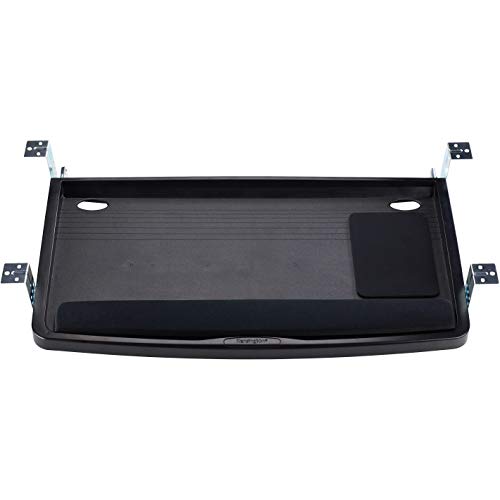
The Kensington K60004US provides the SmartFit system to align height quickly to your personal comfort color, offering an extra-wide 24.5″ tray to accommodate a keyboard, mouse, and wrist rest. This model emphasizes easy height customization, which can be particularly beneficial for users who alternate between sitting and standing or who require precise ergonomic alignment to reduce shoulder and neck tension.
Its broad tray surface accommodates larger keyboards and additional peripherals, making it a suitable option for multimedia or creative workstations. When selecting this tray, verify the available desk clearance and ensure the SmartFit color guidance aligns with your comfort setup.
Buying Guide: Key Purchase Considerations
- Desk compatibility: Check total clamp-to-clamp length, desk thickness, and whether your desk underside is flat and unobstructed for mounting.
- Size and footprint: Measure width and depth to ensure the tray accommodates your keyboard, mouse, and wrist rest with comfort space for movement.
- Motion and ergonomics: Consider the degree of tilt, swivel, and height adjustment that best supports neutral wrists, shoulders, and forearms during long sessions.
- Mounting system: Decide between C-clamp, under-desk brackets, or other mounting styles based on desk material, edge design, and potential damage concerns.
- Extras and compatibility: Look for built-in wrist rests, additional storage, or cable management to reduce clutter and improve organization.
- Durability and load: Verify weight capacity to ensure reliable performance with your typical keyboard and mouse setup over time.
- Future needs: Consider whether you might need to replace or upgrade the tray with a larger surface or different mounting style as your workspace evolves.
- Budget and warranty: Compare price-to-feature value and check warranty terms for long-term usage and support.