The best desk with a printer shelf depends on how much workspace and storage you need. The 65-inch YOMILUVE is best for buyers who want drawers, file storage, and a raised monitor area. The EnHomee suits users who value built-in charging, while the 48-inch DurayLoly is a compact option based on its listed width. For an L-shaped layout, consider the SEDETA or the L-shaped storage desk.
| Desk | Best for | Notable feature |
|---|---|---|
| YOMILUVE 65-inch desk | File and office storage | Drawers, shelves, monitor stand |
| EnHomee 56.5-inch desk | Charging and study setups | Outlets, ports, fabric filing cabinets |
| DurayLoly 48-inch desk | Smaller work areas | Compact listed width |
| SEDETA 66-inch L-shaped desk | Corner workstations | File cabinet and printer shelf |
| L-shaped storage desk | Corner storage needs | File drawer and shelves |
YOMILUVE 65-Inch Desk With File Storage

This desk combines a workstation, file cabinet, and storage shelves. It has two small drawers, one file drawer, and three tiers of shelving. The larger bottom drawer uses hanging rods for legal, letter, A4, and F4 files, according to the product details.
Best for: Home-office users who need organized paper storage and a dedicated printer surface. Its full-width monitor stand is described as able to accommodate two monitors or laptops, and the middle shelf in the left cabinet is adjustable.
Consider: This is a substantial storage-focused design. Check the available floor space and the desk’s full dimensions before choosing it for a compact room.
EnHomee 56.5-Inch Desk With Charging Station

The EnHomee pairs a 40-by-7-inch monitor stand with a charging station containing three standard sockets and two ports. Its storage includes fabric filing cabinets, open shelves, and side pockets. Product details say the open shelves and side pockets can hold a printer and small items.
Best for: Students or home workers who want a raised monitor area and integrated charging for devices. The described storage also makes it a practical choice for keeping documents and office supplies nearby.
Consider: The file storage is described as fabric cabinets. Choose another option if you specifically need a rigid, traditional file drawer or hanging-file hardware.
DurayLoly 48-Inch Desk With Printer Shelf

The product name identifies this as a 48-inch computer desk with a printer shelf, drawer, and hook. Its listed width makes it the most compact choice in this selection by stated desk width.
Best for: Buyers comparing desks for a narrower room or a smaller home-office footprint who still want a designated printer shelf. It was selected because its name directly specifies both the printer shelf and compact width.
Consider: The supplied product information does not detail the shelf dimensions, drawer capacity, or hook placement. Verify those details against your printer and intended setup before buying.
SEDETA 66-Inch L-Shaped Desk
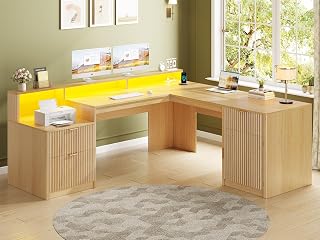
The SEDETA is listed as a 66-inch L-shaped desk with a file cabinet, printer shelf, monitor stand, power outlets, and LED lights. Its corner format offers a different layout from straight desks and may help define a dedicated work area.
Best for: Buyers who want a larger corner workstation with named features for printing, filing, and monitor placement.
Consider: The product details provided do not specify the number or type of outlets, shelf measurements, or the L-shape’s complete dimensions. Check the listing and room layout before selecting it.
L-Shaped Desk With File Drawer And Shelves

This desk is identified as an L-shaped home-office desk with storage, a file drawer, and shelves. The listing name does not specify a separate printer shelf, so it is a less direct match for that feature than the other selections.
Best for: Buyers prioritizing a corner desk, file drawer, and shelving who are willing to confirm whether the shelf arrangement suits their printer.
Consider: Printer-shelf dimensions and other specifications were not included in the supplied details. Avoid assuming a printer will fit without checking the product measurements.
Buying Guide: How To Choose A Desk With A Printer Shelf
Will Your Printer Fit On The Shelf?
Measure your printer’s width, depth, and height, then compare those figures with the shelf’s usable space in the product listing. Leave room for paper trays, cords, and access to controls. The product names alone do not confirm shelf capacity or printer fit.
Do You Need A Straight Or L-Shaped Desk?
A straight desk may be easier to place along a wall and can suit a compact office. An L-shaped model may provide separate work zones or use a corner, but it needs enough floor space in both directions. Confirm the complete dimensions and orientation before ordering.
What Kind Of Storage Works For You?
Choose drawers or a file cabinet if you need concealed storage for paperwork. Open shelves keep supplies accessible, while fabric cabinets offer a different storage style. If hanging files matter, check whether the desk supports your document sizes and hanging hardware.
Are Monitor Stands And Charging Features Important?
A raised monitor shelf can create a separate display area, but check its width and clearance against your screens and equipment. Integrated outlets and ports can reduce the need to reach a wall outlet; review the listed connection types and placement to see whether they meet your needs.
Frequently Asked Questions
What is the best desk with a printer shelf for file storage?
The YOMILUVE is a strong option based on its listed file drawer, hanging-file rods, two small drawers, and storage shelves.
Which desk in this selection has a built-in charging station?
The EnHomee is described as having three standard sockets and two ports.
Which option has the smallest listed width?
The DurayLoly is listed as 48 inches wide, making it the narrowest by stated width among these desks.
Are L-shaped desks suitable for printer setups?
They can be, but fit depends on the printer-shelf dimensions and the desk’s layout. Check measurements before purchase.
Should a printer sit on any desk shelf?
No. Confirm the shelf’s dimensions and capacity in the product information, and allow space for printer operation and ventilation.