Whether you’re building a home office, a gaming battlestation, or a professional workstation, a dual monitor arm can transform your desk by freeing space, reducing neck strain, and enabling precise screen positioning. This guide highlights five top dual monitor arms that balance load capacity, range of motion, and ease of installation. Each option supports two monitors with VESA mounting and offers smooth adjustments for portrait or landscape viewing. Read on to compare features, compatibility, and ergonomic benefits to help you choose the right model for your workspace.
| Product | Brand | VESA Compatibility | Weight Capacity per Arm | Mounting Base | |
|---|---|---|---|---|---|
| HUANUO Dual Monitor Stand | HUANUO | 75x75mm or 100x100mm | 4.4–19.8 lbs | C-clamp or grommet | 13–32 inches |
| HUANUO NITROGLIDE Dual Monitor Stand | HUANUO | 75x75mm or 100x100mm | up to 26.4 lbs per arm | Clamp/Grommet | 13–40 inches |
| VIVO STAND-V002O | VIVO | 75x75mm or 100x100mm | 4.4–19.8 lbs per screen | Free-standing base | 13–32 inches |
| MOUNTUP Dual Monitor Stand | MOUNTUP | 75x75mm or 100x100mm | 4.4–17.6 lbs per arm | C-clamp or grommet | 17–32 inches |
| ErGear Dual Monitor Stand | ErGear | 75x75mm or 100x100mm | 4.4–22 lbs per arm | VESA mount with clamp options | 17–33 inches |
The following sections review each option’s strengths, installation notes, and motion capabilities. Each product is evaluated for compatibility, adjustment range, and overall value to help you choose a model that fits your desk, screen size, and work style.
HUANUO Dual Monitor Stand – Full Adjustable Arms

This dual-monitor arm supports screens from 13 to 32 inches and 4.4 to 19.8 pounds per monitor. It offers C-clamp or grommet mounting for secure attachment and features a pneumatic spring system for smooth, tool-free adjustment. The design prioritizes stability with a purpose-built hinge structure, aiming to reduce wobble during tilt, swivel, and rotation. It accommodates both landscape and portrait orientations, helping you quickly switch between tasks without repositioning the desk.
Before purchase, confirm three compatibility conditions: size (13–32 inches), weight (4.4–19.8 lbs), and VESA mounting holes at 75×75mm or 100×100mm. If you’re unsure, contact tech support for guidance. The arm’s range and stability make it a strong choice for shared desks or multi-tasking setups that demand reliable motion and solid support.
HUANUO NITROGLIDE Dual Monitor Stand

The Nitroglide model is designed for ultrawide setups with heavier monitors, supporting two screens from 13 to 40 inches and up to 26.4 pounds per arm. It uses a stronger base and dual C-clamps for added stability, making it suitable for larger desks and heavier displays. The arms provide generous extension and height adjustments, enabling users to raise monitors up to about 21 inches and extend up to roughly 25.6 inches for more desk clearance and a better line of sight.
Full motion includes -90 to +90 degrees swivel, -30 to +85 degrees tilt, and 360-degree rotation. This range lets you fine-tune your viewing angle for presentations, calls, or creative work. The wider range is ideal for users who alternate between seated and standing, or who need to place a monitor further back for a deeper field of view.
VIVO STAND-V002O Dual Monitor Arm
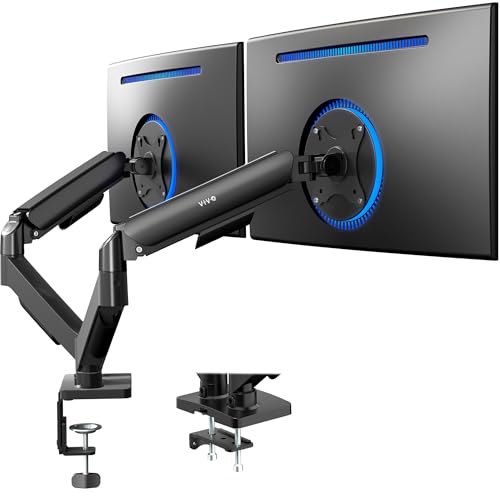
The VIVO Stand-V002O supports two screens from 13 to 32 inches and up to 19.8 pounds per screen, with VESA 75x75mm or 100x100mm compatibility. It uses a pneumatic counterbalance system that allows easy, tool-free installation and effortless adjustment. A notable feature is the standalone base, which provides solid stability without requiring desk modification. The arms offer ±90° tilt, ±180° swivel, and 360° rotation for flexible configuration.
One consideration is that the arms may extend beyond the desk edge, which is common with compact setups. This model is a strong option for users who want straightforward assembly and reliable dual-monitor support with substantial tilt and rotation capabilities for dynamic work environments.
HUANUO 17-32 Inch Dual Monitor Stand

This HUANUO model supports 17–32 inch monitors with a weight range of 4.4–19.8 lbs per arm and VESA patterns of 75×75 mm or 100×100 mm. An extended height feature adds up to about 17 inches of extra reach, elevating screens to approximately 25.19 inches for improved ergonomics. It includes full-motion capabilities: 90° tilt, 180° swivel, and 360° rotation, facilitating portrait or landscape orientations and easier glare management.
The setup emphasizes ergonomic benefits for long work sessions, offering height and angle customization to align screens with eye level. The flexible arms and robust construction make it suitable for office desks and game stations where multiple tasks demand quick reconfiguration of screen positions.
MOUNTUP Dual Monitor Stand

The MOUNTUP dual monitor stand fits most 17–32 inch displays with 75×75 mm and 100×100 mm VESA patterns, supporting a combined weight of 4.4–17.6 lbs per arm. It uses a C-clamp or grommet base for secure mounting and offers a full range of motion: 135° tilt, 180° swivel, and 360° rotation to switch between portrait and landscape configurations. A straightforward installation process makes it suitable for quick upgrades to an existing desk setup.
Key considerations include desk thickness compatibility for C-clamp and grommet bases and ensuring each monitor remains within weight and size limits. The design emphasizes clean aesthetics and independent monitor positioning, helping reduce neck and shoulder strain during extended work sessions.
ErGear Dual Monitor Stand

The ErGear dual monitor stand supports two screens up to 33 inches and up to 22 pounds per arm, with a sturdy steel construction and versatile VESA mounting options. It offers left-right swivel up to ±90°, up-down tilt from -35° to +90°, and full 360° rotation, enabling flexible portrait and landscape viewing. A wide 17.5″ extension and height range help position screens at eye level, which is beneficial for reducing neck strain during long work sessions.
Compatibility notes emphasize verifying monitor size, weight, and VESA hole pattern before purchasing. The arm’s robust build and wide motion range make it a viable choice for demanding multi-monitor setups in both home offices and professional environments.
Buying Guide
Key purchase considerations help you select a dual monitor arm that fits both your hardware and your workflow. Here are the main factors to review:
- Monitor size and weight: Confirm each monitor’s size (in inches) and weight, and ensure they fit within the arm’s stated range. Heavier or larger displays may require reinforced arms or dual-clamp bases.
- VESA compatibility: Most arms use 75×75 mm or 100×100 mm patterns. Verify that your monitors have compatible mounting holes.
- Mounting method: C-clamp, grommet, or freestanding bases affect desk compatibility and stability. Grommets require drilling; C-clamps suit most desks, but check desk thickness limits.
- Motion range: Look for tilt, swivel, and rotation specifications that match your tasks. A wider range supports easier glare control and ergonomic adjustments.
- Height and extension: Some models offer significant vertical reach or desk-extension capabilities. Consider your seating height, desk depth, and the distance to your eyes to avoid neck strain.
- Desk space and aesthetics: A wall or desk-mounted arm should complement your setup without obstructing peripherals or cables. Cable management features can help keep the workspace tidy.
- Durability and warranty: Steel or aluminum builds tend to be sturdier for long-term use. Check warranty terms for coverage on movement and mounting hardware.
Practical considerations include whether you need freestanding positioning versus desk-adjacent mounting, support for ultrawide monitors, and the ability to reconfigure layout for different tasks. If you frequently switch between coding, design, and video calls, prioritize arms with smooth pneumatic or gas-spring adjustments, broad tilt/swivel angles, and robust weight tolerance. For shared workspaces or hot-desking, quick-install bases and compact footprints can be decisive factors in choosing the right model.