Choosing the right dual post monitor stand can enhance desk space, reduce neck strain, and improve productivity. The selections below cover a range of mounting options, from freestanding to clamp-based bases, with strong weight capacities and broad monitor compatibility. Each option supports two screens and offers full motion to tailor viewing angles. This guide highlights five highly rated models from reputable brands to help American buyers compare features, stability, and ease of installation.
| Product | Brand | Screen Range | Weight Capacity (per arm) |
|---|---|---|---|
| HUANUO NITROGLIDE Dual Monitor Stand | HUANUO | 13″–40″ | 26.4 lbs |
| VIVO STAND-V002F Dual Monitor Stand | VIVO | 13″–27″ | 22 lbs |
| VIVO STAND-V002FG Freestanding | VIVO | 13″–32″ | 22 lbs |
| MOUNT PRO Dual Monitor Stand | MOUNT PRO | 13″–27″ | 17.6 lbs |
| Hemudu Dual Monitor Stand Vertical Stack | Hemudu | 13″–34″ | 44 lbs (per monitor) |
Note: Compatibility depends on monitor size, weight, and VESA patterns (75x75mm or 100x100mm). Always verify desk mounting space, base stability, and the presence of VESA holes on your monitors before purchasing. The following sections present five vetted options with detailed features, installation types, and adjustable ergonomics.
HUANUO NITROGLIDE Dual Monitor Stand

The HUANUO NITROGLIDE dual monitor stand is designed to support two monitors from 13″ to 40″ with a robust maximum weight of 26.4 lbs per arm. The dual C-clamp and grommet mounting options provide flexible installation for different desks, including larger workstations. NITROGLIDE technology enables smooth, precise adjustments, while the longer arms and taller mounting range accommodate users of various heights. The system supports VESA 75×75mm or 100×100mm mounting holes and offers a full-motion range: -90° to +90° tilt, -90° to +90° swivel, and 360° rotation. With a taller and sturdier build, it minimizes wobble on heavy or ultrawide monitors. The height can be raised significantly to align screens with eye level, which is beneficial for extended computing sessions.
Key features include: sturdy aluminum construction, compatibility with ultra-wide displays, extended reach, integrated cable management, and a secure mounting system. This model is suitable for busy workstations requiring elevated ergonomics and reliable dual-screen performance without desk clutter.
VIVO STAND-V002F Dual Monitor Desk Stand

The VIVO STAND-V002F provides a freestanding dual monitor solution for screens up to 27″ and 22 lbs each. It uses a stable base that sits on the desk, which helps avoid drilling or clamping into the workspace. The arms offer comprehensive motion: +90° to -90° tilt, 180° swivel, 360° rotation, and height adjustments along the center pole, enabling easy portrait or landscape positioning. Detachable cable clips help keep power and AV cables organized, maintaining a clean desk area. The large base footprint contributes to stability, and padding protects the desk surface from scratches. This model is ideal for users wanting a simple setup with flexible positioning without permanent modifications to the desk.
Considerations include ensuring the desk space accommodates the base footprint, verifying weight compatibility with current monitors, and acknowledging that the freestanding design may require more desk real estate than clamp-based mounts.
VIVO Freestanding Dual Monitor Stand with Glass Base

The VIVO STAND-V002FG stands out with a sleek glass base and two arms supporting dual monitors up to 32″ and 22 lbs each. The foundation uses a tempered glass base to combine style with stability. This model supports VESA mounting holes on the back of each monitor (75x75mm or 100x100mm) and offers a full range of motion: +90° to -90° tilt, 360° swivel and rotation, as well as height adjustments along the central pole. The design favors portrait or landscape configurations and accommodates varied desk aesthetics with its modern footprint. It’s particularly suitable for users seeking a stylish, low-profile, high-stability dual-monitor system for professional or home office setups.
Users should note the glass base requires careful placement on desks with a flat surface and sufficient clearance. Weight distribution and balance should be checked, particularly when using heavier or wider monitors.
MOUNT PRO Dual Monitor Stand

The MOUNT PRO dual monitor stand is designed for two monitors up to 27 inches, each weighing up to 17.6 lbs. It features a full-motion design with -70° to +70° tilt, -90° to +90° swivel, 360° rotation, and height adjustment up to 18.1 inches. The VESA compatibility is 75×75 mm and 100×100 mm, and the V-shaped base emphasizes stability on various desk surfaces, reducing tipping risk. The base’s design also includes a groove to hold a mobile phone, expanding desk convenience. This model is suitable for users who require substantial tilt, swivel, and rotation flexibility for tasks such as design work, coding, or multi-document monitoring.
Careful assembly ensures balance, especially when using two similarly weighted displays. The stand’s ergonomic benefits come from precise positioning and easy reach to a multitude of viewing angles.
HUANUO 17-32 Inch Dual Monitor Stand
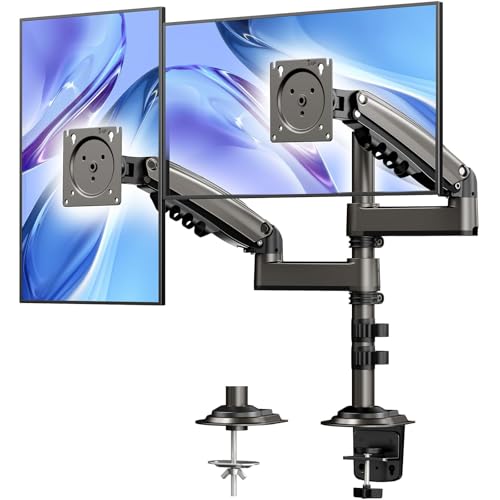
This HUANUO model targets mainstream dual setups with monitors ranging from 17 to 32 inches and a weight limit of 19.8 lbs per arm. It requires VESA mounting holes on the back of each monitor (75x75mm or 100x100mm). The stand offers an additional height option with 17 inches of column length, allowing the top of the monitors to be aligned at comfortable eye level. The extended arm design provides +90° to -90° tilt, 180° swivel, and 360° rotation for flexible orientation. A notable benefit is the long-term ergonomic benefit of higher placement for taller users or tall desks, aiding neck and shoulder comfort during prolonged use.
Potential considerations include ensuring monitor weights stay within the specified range to avoid strain or instability and verifying the installation space for the extended height when fully raised.
Buying Guide: How to Choose the Right Dual Monitor Stand
- Monitor compatibility: Confirm that each monitor is within the supported size range and weight per arm, and that the monitor has VESA 75x75mm or 100x100mm mounting holes.
- Mounting method: Decide between clamped, grommet, or freestanding bases. Clamps and grommets save desk space and provide sturdy mounting for most desks, while freestanding stands are easier to install and remove but require a stable desk surface.
- Ergonomics and reach: Look for stands with ample height adjustment and tilt/swivel/rotation ranges to achieve eye-level alignment and reduce neck strain. Longer arms can improve reach but may increase desk footprint.
- Stability: Base design matters—heavy bases or V-shaped bases help prevent tip-over with larger monitors. If room on the desk is limited, prioritize clamp or grommet options with strong support.
- Cable management: A built-in cable management system helps keep cables organized and reduces desk clutter, contributing to a cleaner workspace.
- Build quality and materials: Aluminum arms and steel construction typically offer better durability and smoother motion compared with cheaper plastics.
- Future-proofing: If you anticipate larger or heavier monitors later, select a model with a higher weight capacity and adjustable arm length to accommodate growth.
- Installation ease: Some models include tool-free adjustments, while others require tools for tightening joints. Consider your comfort level with assembly time and complexity.
In summary, the right dual monitor stand must balance monitor compatibility, desk space, and ergonomic benefits. Whether you need a freestanding design for quick relocation, or a clamp-based system for a sleek, space-saving setup, the five options above cover common needs—from ultrawide support to slim, aesthetically clean bases—while maintaining flexible positioning and stable performance for daily use.