If you work with two monitors, a freestanding dual monitor mount can free up desk space while offering flexible viewing angles. This guide reviews five well-rated freestanding models that support two screens and adjustable arms, helping you choose the right fit for your workspace. Each option below emphasizes stability, range of motion, and user-friendly cable management to keep your desk neat and productive.
Summary of chosen products:
| Product | Brand | Screen Size Range | Weight Capacity Per Arm | Key Feature |
|---|---|---|---|---|
| VIVO STAND-V002F | VIVO | 13″–27″ | Up to 22 lbs | Heavy base and full articulation |
| MOUNT PRO Dual Monitor Stand | MOUNT PRO | 13″–27″ | Up to 17.6 lbs | Wide V-shaped base for stability |
| VIVO STAND-V002FG | VIVO | 13″–32″ | Up to 10 kg (22 lbs) per arm | Tempered glass base with sturdy support |
| WALI MF002 | WALI | Up to 27″ | Up to 22 lbs per arm | Detachable plates and tall adjustable pole |
| VIVO STAND-V038FG | VIVO | 13″–38″ | Up to 22 lbs per arm | Sleek glass base and ultrawide support |
VIVO STAND-V002F Dual Monitor Freestanding Desk Stand

Designed to hold two screens from 13″ to 27″ and up to 22 lbs per arm, this freestanding mount uses a broad base for stability. It includes detachable cable clips to keep power and AV cables organized along the arms and center pole. The arms offer +90° to -90° tilt, 180° swivel, and 360° rotation, with vertical height adjustment for flexible viewing angles. A padded base protects your desk surface from scratches while maintaining a solid center of gravity.
The dual-arm system enables easy portrait or landscape positioning. While stable, the setup is also straightforward to adjust as your task shifts—from coding to design reviews. The mount’s VESA compatibility is 75x75mm or 100x100mm, accommodating a wide range of monitors from most major brands. This model is a practical baseline for users seeking a sturdy, no-fuss freestanding solution.
MOUNT PRO Dual Monitor Stand

The MOUNT PRO stand supports two monitors up to 27 inches and 17.6 lbs per arm, with a full range of motion: -90° to +70° tilt, -90° to +90° swivel, and 360° rotation. Height is adjustable up to 18.1 inches, making it easy to align screens for ergonomic comfort. The stand is designed for two monitors of similar weight and uses a heavy, wide V-shaped base that stabilizes the setup and helps prevent tipping. A built-in groove in the base accommodates small items, potentially boosting desk organization.
With universal compatibility for VESA patterns 75×75 mm or 100×100 mm, this mount is a strong choice for balanced dual-monitor arrays. The base design prioritizes stability on a variety of desk surfaces, from glass to wood. This model suits users who value robust construction and a straightforward adjustment process without sacrificing desk space.
VIVO Freestanding Dual Monitor Stand With Glass Base

This freestanding unit supports two monitors from 13″ to 32″ with a 10 kg (22 lbs) per arm capacity. It features detachable cable clips for clean cable management on the arms and center pole. The arms offer +90° to -90° tilt, 360° rotation, and 360° swivel to switch between landscape and portrait modes with ease. The base is a heavy, tempered glass design that adds stability and a touch of modern aesthetics. Desk protection padding helps prevent scratches, making it suitable for premium workstations.
Monitors can be positioned in both portrait and landscape orientations, though the glass base design requires careful placement on more slippery desk surfaces. The mount’s wide compatibility with 75×75 mm or 100×100 mm VESA patterns makes it a versatile option for many two-monitor setups, particularly where aesthetics and stability are priorities.
VIVO STAND-V038FG Freestanding Dual Ultrawide Mount
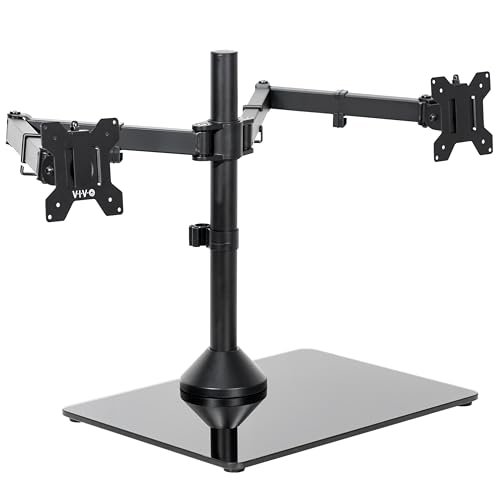
This freestanding mount is engineered to support two ultrawide monitors from 13″ to 38″ with a per-arm weight limit up to 22 lbs. It features a tempered glass base for stability and a steel pole with adjustable arms for +90° to -90° tilt, 180° swivel, 360° rotation, and height adjustment along the center pole. The design accommodates portrait or landscape positioning, making it ideal for expansive workstations or multimedia setups that require large display real estate.
Although the ultrawide compatibility is a major advantage, users should ensure their desk space can accommodate the broader base and longer monitor widths. The stand’s cable management clips help maintain a tidy surface, and the robust base helps maintain stability even with wider screens. This option is well-suited for professionals who rely on multiple large monitors for data analysis, design work, or video editing.
Buying Guide: Key Considerations For Freestanding Dual Monitor Mounts
When selecting a freestanding dual monitor mount, consider compatibility, stability, adjustability, and desk impact. The following perspectives help balance diverse needs:
- Monitor size and weight: Check each model’s supported range and per-arm weight capacity. Ultrawide and heavier displays demand sturdier bases and sometimes broader footprints.
- VESA compatibility: Most mounts support 75×75 mm or 100×100 mm; confirm your monitors match these patterns to ensure secure mounting.
- Articulation range: Tilt, swivel, rotation, and adjustable height determine how easily you can reach optimal ergonomics and screen alignment for different tasks.
- Base design and desk protection: A heavy base improves stability, while padding or feet protect the desk surface from scratches and scuffs.
- Cable management: Detachable clips or integrated channels help reduce cable clutter and improve workspace aesthetics.
- Desk space and placement: Freestanding mounts save space but require adequate room for the base and extended arms, especially with ultrawide setups.
- Installation and maintenance: Consider models with tool-free adjustments for quick repositioning and simpler upkeep.
For multi-monitor workstations, choose a unit that aligns with your primary screen size, the total width of both displays when placed side-by-side, and whether you expect to adjust screens frequently. If you use ultrawide displays or require portrait-mode capability often, prioritize models with sturdy glass or wide bases and broader tilt/swivel ranges. Finally, verify compatibility with your desk material and thickness to avoid wobble or instability.