Maximize desk space and ergonomics with dual vertical monitor stands designed to hold two screens in a stacked, portrait-friendly layout. This guide reviews top models compatible with 13”–34” displays, emphasizing height adjustability, tilt and swivel range, and solid bases for stable, clutter-free workstations. All picks support common VESA patterns and can help reduce neck and shoulder strain during long sessions.
| Product | Brand | Max Load (per screen) | Screen Size Range | |
|---|---|---|---|---|
| Dual Monitor Stand – Vertical Stack | Hemudu | 44 lbs | 13”–34” | 50° to -50° swivel; 12-height levels |
| VIVO STAND-V002T | VIVO | 22 lbs | 13”–34” | Extra tall, integrated height adjustment |
| HUANUO NITROGLIDE | HUANUO | 19.8 lbs | 13”–32” | Extra height extension; full motion |
| ARES WING Dual Monitor Stand | ARES WING | 44 lbs | 17”–49” | Gas spring; high range tilt and swivel |
| MOUNT PRO Vertical Dual Monitor Mount | MOUNT PRO | 17.6 lbs | 13”–32” | Full motion with ±90° swivels |
Hemudu Dual Monitor Stand – Vertical Stack
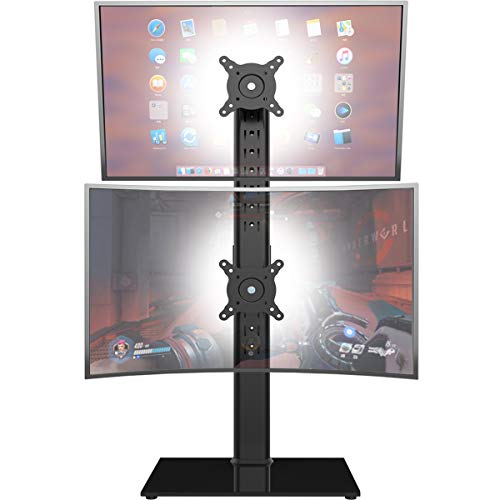
The Hemudu vertical dual monitor stand supports two screens ranging from 13” to 34” and up to 44 lbs per screen. It offers backside mounting hole patterns of 50x50mm, 75x75mm, or 100x100mm and includes integrated cable management to keep cords organized. The mounting brackets provide +50° to -50° swivel and +10° to -15° tilt, with 12 height settings along the center pole. This setup helps position monitors at ergonomic heights to reduce neck and shoulder strain during long work sessions.
VIVO Dual Monitor Desk Stand – Stand-V002L
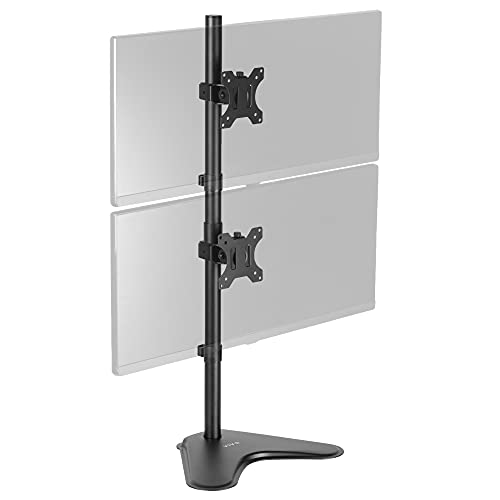
The VIVO STAND-V002L freestanding dual monitor mount holds two ultrawide screens, 13” to 34”, up to 22 lbs per monitor, with 75x75mm or 100x100mm VESA patterns. It features tilt from +45° to -45°, 360° swivel, 360° rotation, and height adjustments along a center pole. Monitors can be oriented portrait or landscape, and the wide base provides solid desk stability. This model is designed for robust, space-saving vertical stacking in compact workspaces.
ARES WING Dual Monitor Stand – Ultrawide
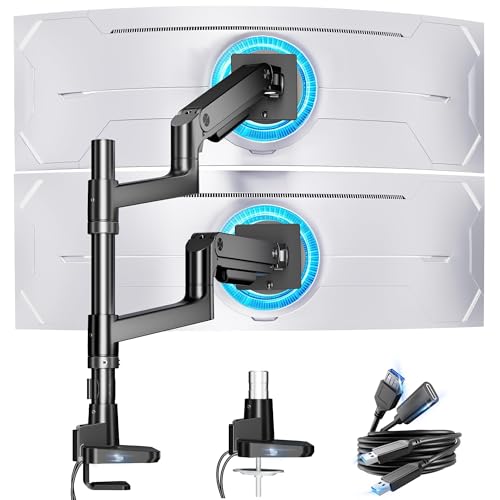
The ARES WING vertical dual monitor stand is designed for ultrawide and curved screens from 17” to 49”. Each arm supports up to 44 lbs, using a gas-spring-assisted mechanism for smooth height adjustments up to 27.9 inches. It provides tilt from -50° to +20°, ±90° swivel, and 360° rotation. This model suits larger monitors or edge-to-edge desk setups, delivering flexible stacking and dynamic viewing angles for gaming, editing, or multi-tasking.
MOUNT PRO Vertical Dual Monitor Mount

The MOUNT PRO vertical dual monitor mount supports two screens from 13” to 32” with VESA 75x75mm or 100x100mm patterns. Each arm holds up to 17.6 lbs, enabling full motion with tilt up to 90°, rotation 360°, and side-to-side swivel ±90°. A 28-inch column offers ample height adjustment to position monitors at eye level, suitable for reducing neck strain and enabling comfortable long sessions.
HUANUO Dual Monitor Stand (13–34 Inches)

HUANUO’s vertical dual monitor stand fits two 13”–34” screens with 50x50mm, 75x75mm, or 100x100mm VESA patterns and supports up to 44 lbs per monitor. It features 13 height settings from 9.5″ to 32.3″ and a tool-free tilt range of -15° to +10°, plus a +/-50° swivel for flexible orientation. The design prioritizes ergonomic viewing angles to minimize strain and improve posture during extended use.
HUANUO NITROGLIDE Dual Monitor Stand

The HUANUO NITROGLIDE dual monitor stand extends up to 25.19 inches with an additional height option and includes 90° tilt, 180° swivel, and 360° rotation. It supports two monitors up to 32 inches and 19.8 lbs per arm, with VESA mounting of 75x75mm or 100x100mm. The setup aims to reduce neck strain while offering versatile positioning for dynamic work and entertainment tasks.
Buying Guide: Key Purchase Considerations
When choosing a dual vertical monitor stand, consider these factors to ensure a fit for your workspace and use case:
- Screen size and weight: Verify each arm’s maximum load per monitor and supported screen size range (e.g., 13”–34” or 17”–49”). Heavier ultrawide displays may require sturdier, gas-spring or heavy-duty designs.
- VESA compatibility: Most stands support 75x75mm or 100x100mm patterns; confirm your monitors’ VESA mounting points before purchase.
- Height adjustment: Look for a tall column or ample vertical travel to position monitors at eye level. More height settings benefit users of different heights and seating arrangements.
- Motion range: Tilt, swivel, and rotation determine how easily you can reduce glare and adapt to tasks. Full 360° rotation is valuable for portrait/landscape changes and shared workspaces.
- Desk footprint and base: A stable base andanti-scratch padding protect your desk surface. Heavier bases improve stability in extended sessions or with larger displays.
- Cable management: Integrated channels keep cords organized, reducing clutter and potential tangling with movements.
- Installation and compatibility with existing setups: Some mounts are freestanding; others require clamps or grommets. Consider desk thickness and available mounting options.
- Ergonomics and posture: Adjustable heights and viewing angles can help reduce neck strain and improve overall posture during long workdays.
- Future proofing: If you anticipate upgrading to larger or heavier monitors, prioritize stands rated for higher loads and extended height ranges.
Across these options, users seeking compact yet sturdy vertical stacking often prioritize models with robust tilt/swivel ranges and a generous height adjustment to align with eye level. For ultrawide displays or taller desks, models featuring gas springs or extra tall columns may provide smoother performance and better ergonomics. Compatibility with a broad range of monitors, including curved and flat panels, broadens the long-term usefulness of the stand.