Choosing a single monitor arm can transform your workspace, reducing neck strain and freeing up desk space. This guide features five top-rated single monitor arms that pair strong compatibility with easy adjustments, so you can find the right fit for most 13″–34″ displays. Each option supports VESA compatibility, gas or mechanical spring mechanisms, and tool-free or minimal-tools installation for quick setup.
Product comparison at a glance:
| Product | Screen Range | Weight Capacity | Mount Type | Adjustment |
|---|---|---|---|---|
| HUANUO Single Monitor Mount (B07T3KCQ94) | 13″–32″ | 4.4–19.8 lbs | Gas Spring | Tilt -50° to +85°, Swivel ±90°, Rotate 360° |
| VIVO STAND-V001 | 13″–38″ ultrawide | Up to 22 lbs | Clamp/Grommet | Tilt ±90°, Swivel 360°, Rotation 360° |
| VIVO STAND-V001O | 17″–32″ | 4.4–19.8 lbs | Mechanical Arm | Tilt ±90°, Swivel 180°, Rotation 360° |
| WALI GSMP001N | 17″–34″ | Up to 26.4 lbs | Gas Spring | Tilt +70°/−45°, Swivel 180°, Rotation 360° |
| HUANUO B08FB7WFCT | 13″–34″ | 4.4–19.8 lbs | Gas Spring | Tilt +85°/−30°, Swivel 180°, Rotation 360° |
HUANUO Single Monitor Mount With Gas Spring
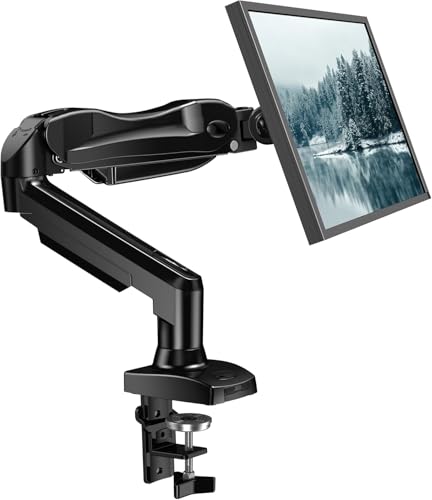
The HUANUO single monitor arm accommodates most 13–32 inch displays and supports 4.4–19.8 pounds. It features a VESA 75x75mm and 100x100mm pattern compatibility, a tilt range of −50° to +85°, ±90° swivel, and 360° rotation. This design emphasizes ergonomics, enabling height adjustments up to 39.6 cm from the desk with one hand. Automotive-grade components and extensive motion testing bolster durability for long-term use.
VIVO Ultrawide Monitor Arm With C-Clamp Or Grommet

This VIVO single-arm mount fits screens from 13″ to 38″ and supports up to 22 lbs, including ultrawide monitors up to 38″. It offers +90° to −90° tilt, 360° swivel, and 360° rotation with height adjustment up to 16″ along the center pole. The desk clamp accommodates desks up to 3.25″ thick, with an optional secure grommet mount included for flexible installation.
VIVO Counterbalance Arm For 17″–32″ Monitors

Designed to fit 17″–32″ displays weighing 4.4–19.8 lbs with VESA 75x75mm or 100x100mm, this arm uses a mechanical counterbalance for smooth, tool-free placement in all directions. It tilts +90° to −90°, swivels 180°, and rotates 360°, allowing versatile portrait or landscape setups while keeping cable management simple.
WALI Gas Spring Monitor Arm For 17″–34″ Screens

This WALI arm supports 17″–34″ displays with a maximum 26.4 lbs load (flat screens) or 19.8 lbs (curved). It uses a gas spring for height and depth adjustment, offering +180°/−180° swivel, +70°/−45° tilt, and 360° rotation. It ships with both C-clamp and grommet mounting options for desk compatibility and flexible setup.
HUANUO Adjustable Desk Mount For 13–34 Inch Screens

A larger HUANUO model for 13–34 inch monitors with a weight range of 4.4–19.8 pounds. It uses a gas spring plus VESA 75x75mm and 100x100mm compatibility, with tilt from −50° to +30°, ±90° swivel, and 360° rotation. The arm reaches up to 39.6 cm from the desk, and its automotive-grade core emphasizes long-term stability and ease of use.
Buying Guide: Key Purchase Considerations
- Monitor size and weight compatibility: Confirm your monitor’s size and weight fall within the arm’s supported range to ensure safe operation and full range of motion.
- VESA pattern compatibility: Most arms support 75x75mm or 100x100mm. Verify your monitor’s pattern before purchase.
- Mounting method: Clamps work well on sturdy desks; grommet mounts require a pass-through hole. Choose based on desk construction and preferred aesthetics.
- Adjustment range: Look for tilt, swivel, and rotation specs that suit your workflow, whether coding, designing, or gaming. Gas spring arms often offer smoother one-handed adjustments; mechanical counterbalance arms can be precise and durable.
- Height and reach: Ensure the arm can reach your preferred viewing distance and raise or lower to ergonomic eye level. Longer arms can help free up desk space on crowded desktops.
- Durability and testing: Consider products with automotive-grade components or documented motion tests to gauge long-term reliability.
- Desk space and cable management: Check for integrated cable guides or channels to reduce clutter and protect cords during movement.
- Compatibility with ultrawide or curved monitors: If you use ultrawide screens, verify the arm’s capacity and mounting range accommodate the width and center of gravity.
- Installation effort: Some arms require little more than hand-tightening, while others may need tools. Review the included hardware and setup time estimates.
The selections above emphasize broad compatibility, sturdy construction, and flexible adjustment to support diverse workflows—from home offices to professional suites. Each option integrates easily with standard VESA displays and offers a range of tilt, swivel, and rotation movements to optimize posture and desk space.