Choosing the right under-desk keyboard tray can enhance comfort, posture, and productivity. The following guide highlights five top slide-out trays with tilt and height-adjustment features, helping you find a solution that fits your desk and usage. Each option supports smooth motion, secure mounting, and ample space for keyboards, mice, and accessories.
| Product | Brand | Key Feature |
|---|---|---|
| HUANUO Keyboard Tray Under Desk | HUANUO | 360° swivel, 6° up / 22° down tilt, 6.3″ height adjust |
| EUREKA ERGONOMIC 28″ Keyboard Tray | EUREKA ERGONOMIC | 360° swivel, 43° vertical tilt, desk-beam compatibility |
| PEGZONE Keyboard Tray Under Desk | PEGZONE | 180° horizontal, 6.1″ height adjust, 15°–6° tilt |
| EUREKA ERGONOMIC 32″ Tray | EUREKA ERGONOMIC | 32″ wide, 360° swivel, 43° tilt |
| CARTMAY Keyboard Tray Under Desk | CARTMAY | 180° swivel, 7° up / 22° down tilt |
Note: All options are designed to install under the desk for a cleaner workspace. Before buying, verify desk thickness, beam presence, and mounting space to ensure proper fit and clearance for legroom and movement.
HUANUO Keyboard Tray Under Desk

The HUANUO under-desk keyboard tray offers a full-size 25″ x 9.84″ surface with a wrist rest for enhanced comfort. It features a full-motion platform that swivels 180 degrees and tilts up to 6 degrees and down 22 degrees, enabling dynamic positioning during typing. With a total height adjustment range of 6.3 inches, this tray supports sit-to-stand ergonomics. When lowest, the connector height is 7.48 inches. The weight is approximately 10 pounds, and it is suitable for keyboards, mice, and additional desk accessories.
EUREKA ERGONOMIC Height Adjustable Keyboard Tray (28×10)

The Eureka Ergonomic tray is a 28.3″ x 10.2″ surface designed to hold a keyboard and mouse with substantial room. It offers 360° swiveling and a 43° tilt range, plus a gravity self-locking mechanism to resist unwanted movement. The tray fits desks with beams and is compatible with wooden or MDF desktops; ensure a desk thickness of at least 0.71 inches. The depth of the mounting bracket is 17.8 inches, so verify adequate desk length and legroom before installation.
PEGZONE Keyboard Tray Under Desk (25×11)

PEGZONE offers a fully adjustable under-desk keyboard tray with 180° horizontal rotation, 15° vertical tilt, and up to 6.1 inches of height adjustment. It emphasizes ergonomic wrist and arm alignment for long sessions. Compatible with various desk types, including those with beams, and features a straightforward 3-step installation so users can set it up quickly. The surface supports standard keyboards and mice, with space for a compact desk footprint.
Pull Out Cabinet Organizer by Kitstorack
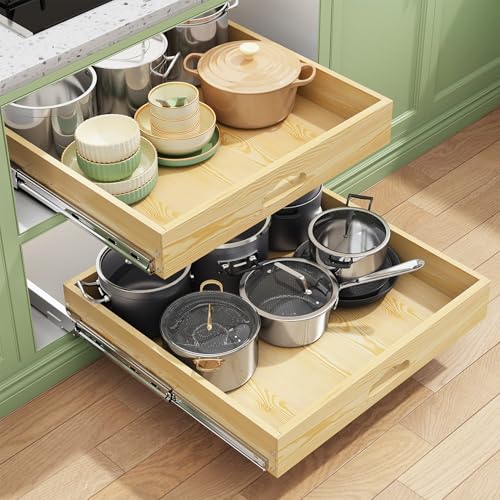
While primarily a cabinet organizer, this full-extension, soft-close pull-out design demonstrates the benefits of smooth, guided motion for under-desk setups. It features a 21″ square footprint and offers robust extension with an emphasis on quiet, controlled closing. Consider this option if your workspace blends storage with a tilting, sliding mechanism that complements a keyboard tray system in a modular setup.
CARTMAY Keyboard Tray Under Desk

The Cartmay tray provides a 25″ x 9.84″ surface with full-motion capability, including 180-degree left-right swivel and a tilt range of 7 degrees up and 22 degrees down. It includes a wrist rest and supports a 10-pound tray weight. This model is designed for desks with beams and requires careful measurement of desktop thickness and beam height to ensure secure mounting and proper operation.
Buying Guide: Key Purchase Considerations
- Desk compatibility: Check desk thickness, presence of beams, and available depth. Some trays require a minimum desktop thickness (often around 0.71 inches) and enough under-desk clearance for legroom.
- Motion range: Look for 180-degree swivels, tilt ranges (roughly 15–43 degrees), and height adjustments that suit your working posture and whether you switch between sitting and standing.
- Weight and construction: Heavier trays (around 8–12 pounds) tend to feel sturdier and slide more smoothly. Ensure your desk can support the weight without bending or wobbling.
- Ease of installation: Favor trays with straightforward installation steps and clear mounting brackets. Some models specify compatibility with desks that have beams or certain desk materials.
- Surface area: Ensure the tray surface accommodates your keyboard, mouse, and any wrist rest or accessories. A larger surface reduces clutter and allows comfortable positioning.
- Mounting options and versatility: Consider whether the tray supports beaming, dual-mount configurations, or adjustable mounting to fit left- or right-handed setups.
- Ergonomic benefits: A proper tilt and height adjustability promote neutral wrist alignment and reduce strain during long typing sessions.
- Maintenance and noise: Soft-close features minimize noise and wear. Look for self-locking mechanisms to avoid unintended movement during use.
Comparative Outlook
For users prioritizing a wide, roomy surface, the 32″ Eureka Ergonomic model offers expansive space and robust tilt options, suitable for larger keyboards or multi-device setups. If space is modest but smooth motion and easy installation matter, HUANUO and CARTMAY provide compact but capable options with reliable tilt and swivel ranges. PEGZONE emphasizes ergonomic reach and simple mounting with broad desk compatibility, while the 28″ Eureka Ergonomic strikes a balance between surface area and compact install depth. Evaluating desk structure, movement needs, and accessory compatibility will guide the best choice for a tilt-down, slide-out keyboard tray.