The best stand-up computer cart depends on your equipment and how you work: the Techni Mobili cart suits compact laptop setups, the Mount-It! 32-inch model adds a monitor shelf and keyboard tray, and the QZMDSM offers three storage shelves for small spaces. For dual-screen tasks, consider Mount-It!’s dual-monitor cart; for a height-adjustable workstation with a monitor mount and CPU holder, consider Natwind. Compare adjustment range, storage, and monitor support before choosing.
| Cart | Best For | Notable Feature |
|---|---|---|
| Techni Mobili Adjustable Height Cart | Laptop users who need compact storage | Locking casters and 28.25–43-inch adjustment |
| Mount-It! Cart With Monitor Mount | Single-monitor work and presentations | Monitor shelf, keyboard tray, and bottom storage |
| QZMDSM Rolling Desk | Small rooms and everyday tasks | Three shelves and 28–36.4-inch adjustment |
| Mount-It! Dual Monitor Cart | Two-screen mobile work | Independent screen and keyboard adjustment |
| Natwind Mobile Workstation | Flexible work with a monitor and CPU | Gas-spring adjustment and foot-operated locks |
Techni Mobili Adjustable Height Rolling Laptop Cart

This cart is best for laptop users who want a relatively compact workstation with a place for accessories. Its height adjusts from 28.25 to 43 inches using dual adjustment knobs, giving it a range for seated or standing work. An open storage compartment includes an accessory shelf, and double-wheel, non-marking casters have locking mechanisms.
Why it stands out: The height range and built-in storage make it a practical choice for moving a laptop setup between rooms while keeping smaller items nearby. The locking casters can help keep the cart in place when parked.
Consideration: The listed features describe a laptop cart and accessory shelf, not a separate monitor mount or keyboard tray. Choose another option if those components are essential to your setup.
Mount-It! Mobile Cart With Monitor Mount

This Mount-It! cart is best for users who want a mobile standing workstation with a dedicated monitor shelf and keyboard tray. Its height adjusts from 37.25 to 53.75 inches. The top shelf is designed for monitors up to 32 inches, while the middle tray holds a keyboard and mouse. Bottom storage provides space for items such as a printer, PC, or classroom materials.
Why it stands out: The two-tier layout separates the screen from the typing surface, and the broad adjustment range suits users who prioritize a tall standing position. It can also serve as a rolling podium or classroom workstation.
Consideration: The stated monitor limit is up to 32 inches. Users with a larger screen should check the cart’s specifications against their equipment before choosing it.
QZMDSM Rolling Desk With Three Shelves
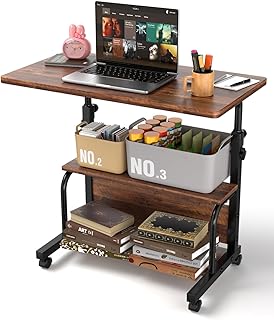
The QZMDSM is best for small rooms, apartments, or multipurpose spaces where storage matters alongside mobility. Its height adjusts between 28 and 36.4 inches, and its three shelf levels provide room for books, office supplies, and other essentials. The product information describes the desk as suitable for office, study, bedroom, and living-room use.
Why it stands out: Three shelves give this option more clearly specified storage levels than a basic laptop stand. Its stated weight is about 15 pounds, and rollers let users move it around a room.
Consideration: Its adjustment range tops out at 36.4 inches, lower than the standing height listed for several other carts here. It may not suit buyers seeking a taller standing position.
Mount-It! Dual Monitor Computer Cart

This cart is best for people who need two screens at a mobile workstation. Its listed features include a dual-screen mount, keyboard tray, and CPU holder. The keyboard tray and monitor mount adjust independently, allowing users to set those parts separately for seated or standing work.
Why it stands out: The dual-monitor configuration is suited to multitasking in offices, classrooms, medical environments, and warehouse settings. Independent adjustments are useful when screen height and typing position need to be changed separately.
Consideration: The supplied product details do not specify a height range or screen-size limit. Confirm that the cart’s dimensions and monitor support meet your requirements before buying.
Natwind Mobile Workstation Cart

Natwind is best for users who want a mobile workstation with a monitor mount, CPU holder, and cable sleeve. Its gas-spring height adjustment runs from 31.3 to 47.1 inches. The top platform supports 33 pounds during adjustment and has a stated static load capacity of 130 pounds. Four-inch industrial casters have foot-operated locks.
Why it stands out: The listed monitor and CPU components make it a more complete workstation choice than a simple rolling laptop desk. Foot locks are convenient when users need to secure the cart without bending down.
Consideration: The top platform’s stated capacity during adjustment is 33 pounds, distinct from its static capacity. Check the load and adjustment conditions for the equipment you plan to place on it.
Buying Guide: How To Choose A Stand-Up Computer Cart
What height range do you need?
Compare the cart’s minimum and maximum heights with your preferred seated and standing positions. The listed ranges vary: QZMDSM adjusts from 28 to 36.4 inches, while the Mount-It! monitor-mount model reaches 53.75 inches. A larger range may offer more positioning flexibility, but verify how the measurement relates to the work surface and your setup.
Do you need a monitor mount or a flat surface?
A laptop-only setup may work well on a basic rolling cart. For a separate monitor and keyboard, look for a cart with a monitor shelf or mount and a dedicated keyboard tray. Dual-screen users should confirm both screen support and any size or weight limits; the supplied details do not list those limits for every model.
How much storage and mobility matter?
Choose storage based on what needs to travel with the workstation. Options here include accessory storage, bottom storage, three shelves, or a CPU holder. For movement, check whether the cart has casters and whether they lock. Natwind specifies foot-operated locks, while Techni Mobili lists locking double-wheel casters.
What load information should you check?
Compare stated capacity with the combined equipment you plan to use, and distinguish an adjustment load from a static load. Natwind provides both figures for its top platform. Do not assume that a cart’s shelves, monitor mount, or keyboard tray share the same capacity unless product specifications say so.
Frequently Asked Questions
Can a stand-up computer cart be used while seated?
Many adjustable carts can be positioned for seated or standing use, but the usable range differs by model. Check the height specifications against your chair and work posture.
Which cart is best for two monitors?
The Mount-It! Dual Monitor Computer Cart is the option in this selection specifically described as having a dual-monitor mount.
Which option has the most clearly specified storage?
QZMDSM lists three shelf levels. The Mount-It! monitor cart also specifies bottom storage, while Techni Mobili includes an accessory shelf.
Are locking wheels included on these carts?
Techni Mobili lists locking casters, and Natwind specifies foot-operated locks on all four wheels. Check each product’s details for wheel-lock information.
What should I verify before ordering?
Confirm the cart’s height range, monitor or laptop support, shelf and tray dimensions, load limits, storage layout, and caster-lock details against your equipment and workspace.