The best TV rack or stand depends on your screen size, mounting pattern, weight, and whether you need wheels, storage, or swivel adjustment. The PERLESMITH PSTVMC06 is best for smaller TVs and basic mobility; the Rfiver mobile cart suits a wider screen range and adjustable shelf; and the PERLESMITH PSTVMC04 supports heavier TVs. The OUKMIC cart adds power outlets and a larger shelf, while the Rfiver swivel floor stand is best for changing viewing angles without wheels.
| Stand | Best for | Key detail |
|---|---|---|
| PERLESMITH PSTVMC06 | Smaller TVs | 23–60 inches; tilts and rolls |
| Rfiver Mobile Stand | Flexible room use | 23–65 inches; adjustable media shelf |
| PERLESMITH PSTVMC04 | Heavier TVs | 23–65 inches; supports up to 99 pounds |
| OUKMIC Rolling Stand | Device storage and power | Four AC outlets and two USB ports |
| Rfiver Swivel Floor Stand | Angled viewing | 70-degree swivel range |
PERLESMITH PSTVMC06 Rolling TV Stand

This mobile stand fits TVs from 23 to 60 inches and supports up to 88 pounds. Its listed VESA patterns range from 100 × 100 mm to 400 × 400 mm, so check the TV’s mounting pattern before choosing it. The screen tilts up 5 degrees and down 10 degrees, which can help adjust the view and reduce glare.
Best for: Buyers who want to move a smaller or mid-size TV between rooms. It was selected for its broad VESA range, wheels, and tilt adjustment. Limitation: Its 60-inch screen limit and 88-pound capacity make it a poorer match for larger or heavier televisions.
Rfiver Mobile Stand For 23–65-Inch TVs
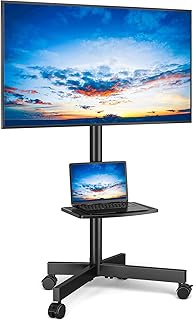
This rolling cart is listed for 23- to 65-inch flat or curved TVs, with a maximum VESA pattern of 400 × 400 mm and a bracket capacity of 88 pounds. Its all-metal construction is paired with a media tray for a laptop, DVD player, gaming system, or other AV equipment. The stand is designed for spaces such as bedrooms, classrooms, offices, and conference rooms.
Best for: Buyers who want one movable stand for different rooms and a shelf for equipment. Choose it over the PSTVMC06 if you need support for a screen up to 65 inches. Limitation: The listed weight capacity is 88 pounds, so confirm the TV’s weight before purchase.
PERLESMITH PSTVMC04 Heavy-Duty Rolling Cart

The PSTVMC04 fits listed TV sizes from 23 to 65 inches and supports up to 99 pounds. Its VESA patterns include sizes through 400 × 400 mm. The media shelf adjusts from 12 to 24 inches above the floor, and the TV bracket offers tilt from 5 degrees down to 10 degrees up. Wheels make it possible to move the cart between suitable spaces.
Best for: Buyers who need more stated weight capacity than the 88-pound rolling stands offer, along with an adjustable equipment shelf. Limitation: Its listed VESA range does not include every possible mounting pattern; verify that the TV’s pattern is supported.
OUKMIC Rolling Stand With Built-In Power

This brown mobile cart is listed for 32- to 80-inch TVs and supports up to 131 pounds. Its built-in power setup includes four AC outlets, two USB ports, and a 6.5-foot cord. The media shelf measures 15.7 × 10 inches and is rated to hold up to 33 pounds. A 27.5 × 15.7-inch base provides space beneath the screen.
Best for: Buyers who want a rolling stand with built-in power for multiple devices and a larger equipment shelf. Its higher listed capacity and broad screen-size range distinguish it from the other mobile carts here. Limitation: The provided product details do not specify a VESA range, so check mounting compatibility before buying.
Rfiver Swivel Floor TV Stand
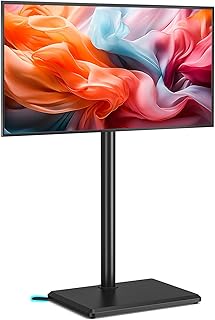
This floor stand is listed for 32- to 70-inch flat-screen TVs. It swivels 35 degrees left or right, for a total 70-degree range, and has three height settings with 5.9 inches of total adjustment. Its compact base uses two reinforced supports positioned at the rear corners.
Best for: Viewers who want to angle a stationary TV toward different parts of a room without using a rolling cart. The swivel and height settings are the main reasons to choose it. Limitation: The supplied details do not state weight capacity or VESA compatibility, so verify both with the product information and your TV before purchase.
Buying Guide: How To Choose A TV Stand
What screen size and weight should the stand support?
Check both the TV’s diagonal screen size and its weight without assuming that a stand rated for a large screen will support every TV of that size. Compare the product’s stated size range and capacity with your television’s specifications. Leave a margin below the stand’s maximum capacity where possible.
Does the mounting pattern match?
VESA is the spacing between the mounting holes on the back of a TV, measured in millimeters. Compare the TV’s VESA dimensions with the stand’s supported patterns. The PERLESMITH carts and Rfiver mobile cart list VESA ranges or limits; the supplied details for the OUKMIC and swivel Rfiver do not, so confirm those specifications before ordering.
Should you choose wheels, swivel, or a fixed floor base?
Choose a rolling cart if the TV needs to move between rooms or work areas. Choose a swivel floor stand if the TV can stay in one place but viewers need different angles. Consider tilt when glare or screen angle is a concern. Check whether the available floor space and stand base suit the intended location.
Do you need shelves or built-in power?
A media shelf can hold listed AV equipment, but compare its dimensions and weight limit with the devices you plan to place on it. The OUKMIC adds AC outlets and USB ports; the Rfiver mobile cart and PERLESMITH PSTVMC04 offer media shelves. Plan cable routing and access to a wall outlet before positioning any cart.
Frequently Asked Questions
Can a rolling TV stand fit any television?
No. The TV must fall within the stand’s screen-size and weight limits, and its VESA mounting pattern must match the stand.
Is a higher weight capacity always better?
It can provide more capacity, but it does not guarantee compatibility. Check screen size, VESA pattern, and the stand’s other specifications too.
What is the difference between tilt and swivel?
Tilt angles the screen up or down. Swivel turns the screen left or right while the stand remains in place.
Can the media shelf hold a game console?
Some models include shelves intended for AV equipment or gaming devices. Check the shelf’s dimensions and stated weight capacity before placing a console on it.